CHI 2026 | Kids Can Build the Game — But May Not Know How to Change It
AI let children build features they had not learned, yet did not necessarily help them understand or revise code. A Scratch programming study with children records the concrete path from creative excitement to getting stuck while debugging.
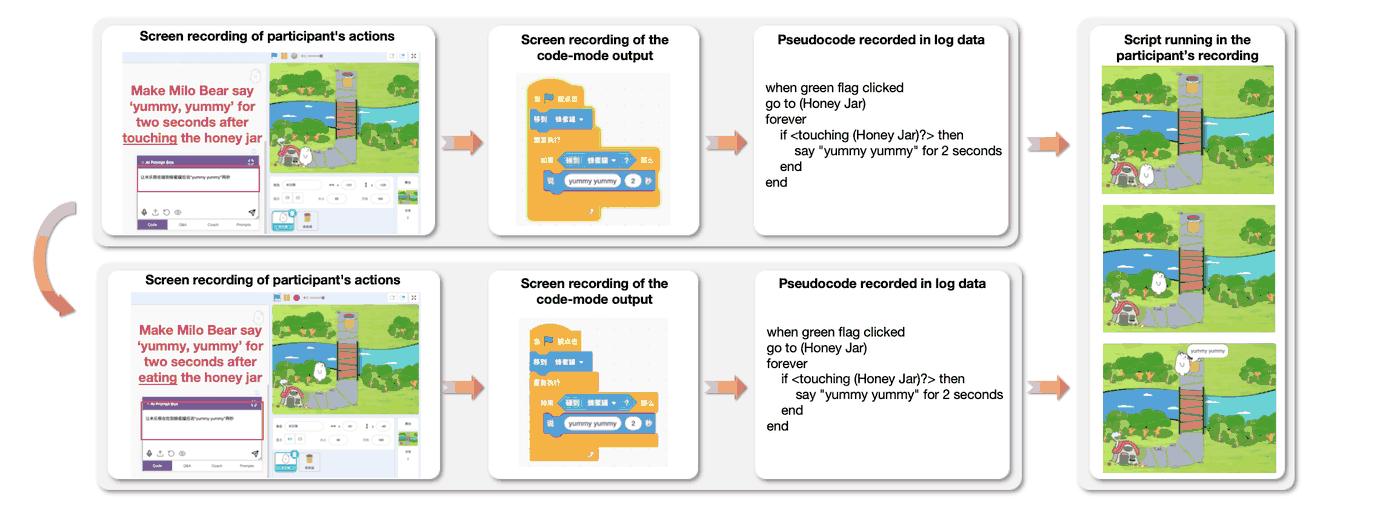
A child wants a little bear to walk along a bridge to the honey. The program AI gives makes the bear run around wildly. The child goes back to revise the prompt, swapping “touch the honey” for “eat the honey,” and the result is still wrong. In the later interview, the child remains confused: the destination was already clear — what else is there to change?
Moments like this reveal the problem better than a polished game demo. Children know what they want to see, yet may not know why the program failed to do it, and still less what the next sentence should add. The chat box is still waiting for a new instruction; the child already has nothing left to say.
This CHI 2026 paper records children’s first attempts at AI-assisted Scratch programming. There is excitement — and also confusion and giving up. It made me notice again a distinction in programming class: turning an idea into a project and figuring out how that project runs need different kinds of help.
01 The study observed how children operated — it did not measure how much scores rose
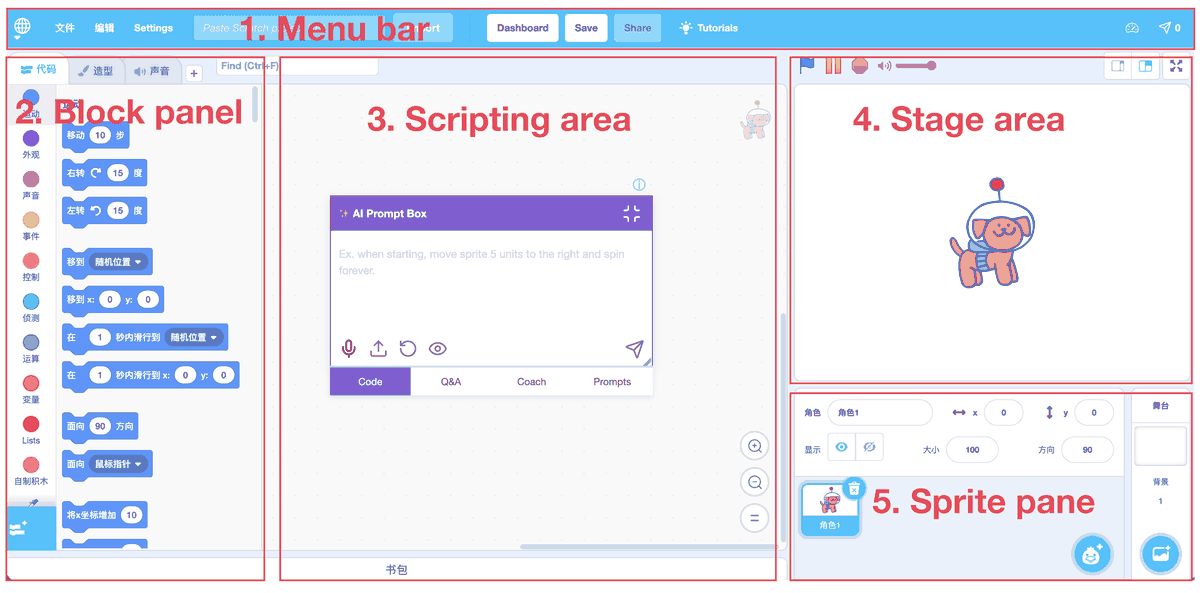
The study used Stax, which adds an AI panel to Scratch’s block programming environment. Children can type or speak to generate block code, ask questions, receive step-by-step guidance, or get project ideas. In Figure 1 the sprites, stage, and block area are still the familiar layout; what is new is the dialogue entry in the middle.
The 41 children in the paper abstract include 8 pilot participants and 33 formal workshop participants. The formal stage split into three groups by Scratch experience: 11 novices, 10 with some foundation, and 12 more skilled. None had used vibe coding before. The first two groups did assigned tasks; the third freely designed games.
The authors analyzed video, screen activity, interviews, and 301 prompt logs. Separately, 5 Scratch teachers tried the tool for a month, then were interviewed. Researchers wanted to understand how children made requests, how they used answers, and what they did after problems; there was no randomly assigned no-AI control group, and no reported pre–post learning gains.
These children also did not simply install the tool and work alone. In the pilot, novices struggled even to start interaction; researchers later added demos and sentence scaffolds, split the novice workshop into two sessions, and had teaching assistants on site. That children could eventually use it depended on the tool and these supports working together.
02 Not yet knowing certain blocks no longer means having to abandon the idea
The most direct gain came from creation. Some children wanted to make a game but had not mastered every implementation method; AI first gave a runnable version, so they were willing to keep trying. One pilot participant generated a game, adjusted sprite and variable names, and actually got it running. That excitement of discovering “I can make this too” is a change visible in interviews.
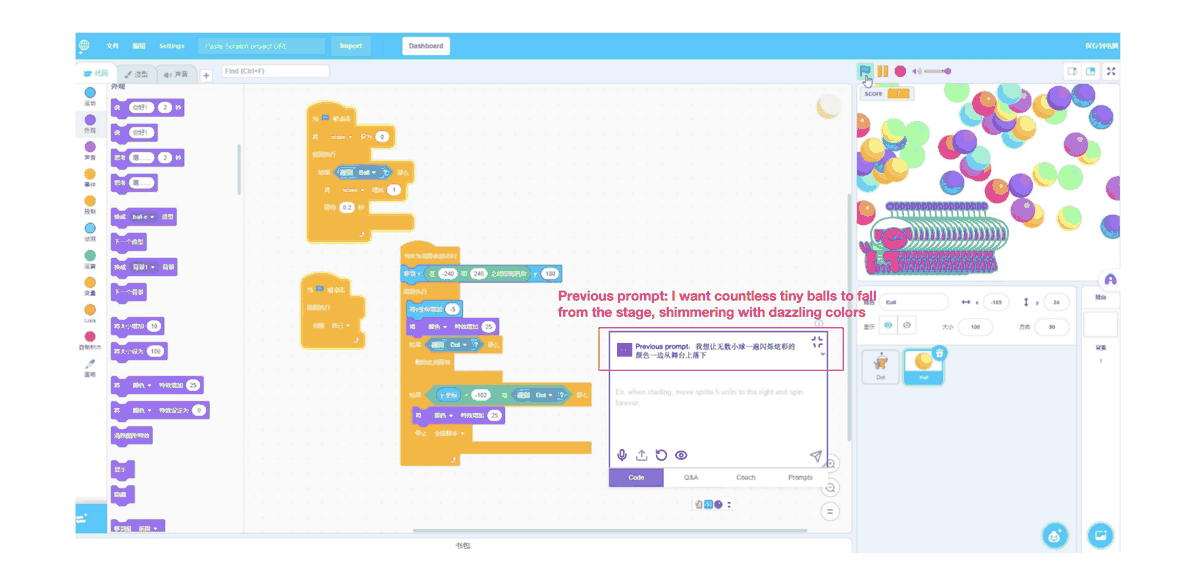
Others made an originally simple coin-catching task more and more complex. In Figure 2 the child asks colorful glowing balls to keep falling on stage; corresponding visual effects appear in the upper right. Here AI’s role is concrete: children need not wait until they have fully learned the relevant blocks before getting a chance to see what their idea looks like.
In overall log analysis the authors report that 68.29% of participants implemented features involving blocks or logic they had not learned. That number supports crossing an implementation threshold — it does not equal that these children had already learned the corresponding concepts. If a lesson’s goal is trying story and game design, such help has value; if the goal is understanding loops, you still need to see whether children have worked through loop logic.
The same analysis found that 53.66% of participants kept relying on AI to generate complete scripts without trying to implement independently. That cannot convert directly into knowledge loss, yet leaves a very practical question: after the project runs, do children still get a chance to build it themselves, change a condition, or explain one stretch? What teachers worry about is exactly that practice being skipped in whole segments.
03 Being able to chat does not mean being able to state what a program requires
One child wanted a fighting-game character to look powerful and scary, but submitted descriptions like “very terrifying,” then kept intensifying the degree. Another wanted a character to speak, found it did not, and typed “not speaking” in code-generation mode. Live, a teacher might follow up combining the action; as a request to generate code, it can easily send the system toward another meaning.
Look again at the word change at the opening. Figure 3 shows that after swapping “touch” for “eat,” the two generations produced the same code. The child wanted the bear to walk across the bridge; the prompt mainly described what to say after reaching the honey. Destination and walking route are two different requirements here.
For someone who already programs, adding route, trigger conditions, and execution order is everyday work. But children come to learn programming precisely to practice those abilities. If the tool first requires them to independently unpack a complex goal, then offers help, it treats a skill still to be learned as a prerequisite for use.
In the logs, 49.83% of prompts were no more than 15 Chinese characters; 21.93% lacked intermediate steps or context and only described the final goal. Short sentences themselves are not necessarily a problem — what matters is what was omitted. Some children even pointed at the screen saying this was wrong, yet could not say where. Merely swapping keyboard for microphone also cannot fill that judgment.
At that point, can the tool first ask: which path do you want the bear to take? Confirm the route, then handle what happens after arrival. Letting children pick a path or tap a location may also suit better than requiring them to state a complete program at once. These are design choices extended from observation; the paper has not yet compared which follow-ups work best.
04 Asking about one concept, receiving a whole page of new ones
P40 asked a very short question: what is a list? The system returned a Chinese answer of over 500 characters that, beyond the definition, brought in add/delete, read, loops, and pseudocode examples. Figure 4 keeps the original paper’s Chinese answer portion. The child needed to tell which parts answered the current question and which were things not yet learned.

P40 found the content too hard and did not keep reading. Screen records show he thereafter avoided lists, including a task researchers originally hoped would use lists for scoring. This case cannot represent all children. But for P40, asking about a concept not yet understood brought more concepts that first had to be figured out — this help request did not help him go on.
Shortening the answer also does not necessarily solve it. Another child asked how many areas Scratch has, got names like stage, sprite list, and code area, and still did not know where to look. Names not mapped to positions on the interface in front of them remain unusable for someone just meeting the environment.
I care more about whether children can keep doing after the answer. Ask where a block is, and the answer should be able to take them to that block; ask what a list is, and first let them see how one piece of data is stored. The authors suggest splitting output into small units and putting visual guidance into the actual interface, rather than packing everything into the dialogue box.
05 After an error, regenerating is often easier than understanding the error
The error in Figure 5 especially shows the problem. The system generated blocks that included an error explanation, and also made the sprite speak that explanation as dialogue. The note asks to use the Q&A feature to continue debugging, but for the child, they must both recognize this as an error and know where to switch and what to ask next. The program did not run as expected, yet the responsibility for recovering operation fell on them.
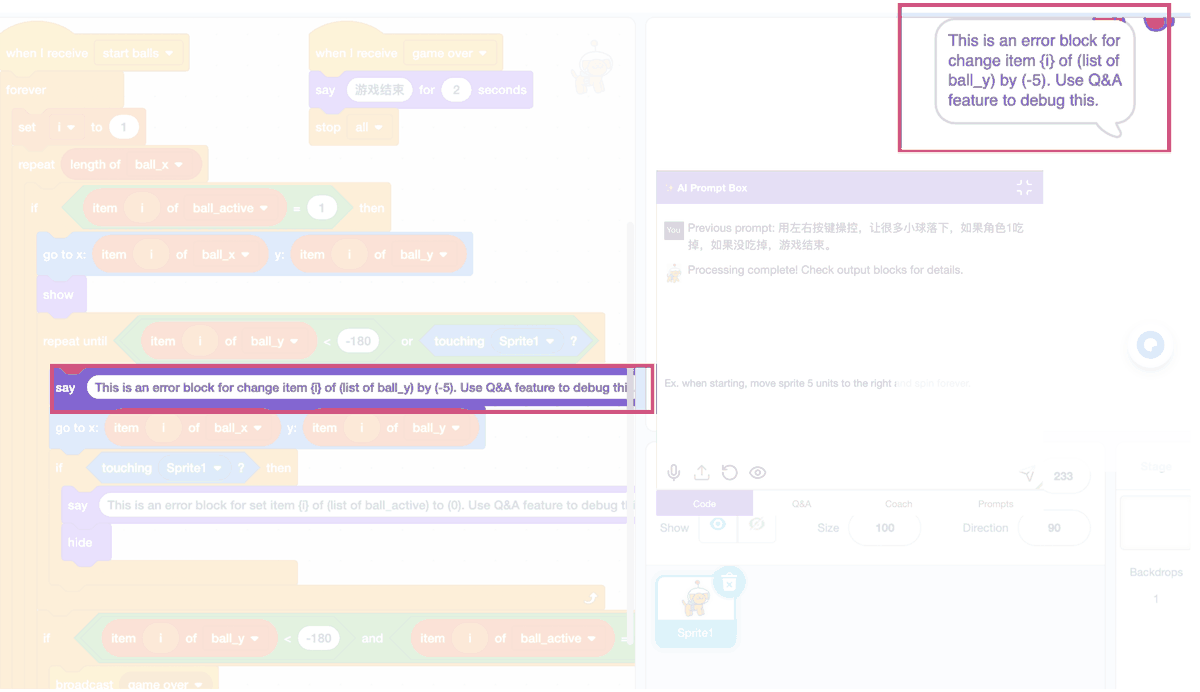
The paper reports that 73.17% of participants closed the dialogue immediately after receiving an error message. That proportion is about participants, not the system’s error rate. When code failed or effects mismatched expectations, children rarely edited AI code block by block; more often they deleted and started over, or rewrote the prompt.
Experienced children exiting also need not mean they understood nothing. P38 felt that rather than spending effort finding where AI wrote wrong, it was better to rewrite themselves; in the open-creation group, half of participants submitted only three prompts on average, concentrated mainly in the stage when the tool was just introduced. When revising projects frequently, they may have judged building blocks themselves as less costly. Low usage here also includes a judgment about tool cost.
Other children cared whether the work counted as their own. Some felt AI was the one who knew how; some compared getting complete code to copying homework. Classrooms need to state use rules clearly: which parts may lean on generation, which still require personal explanation, choice, and revision. The tool encourages finishing fast, yet children feel that counts as copying — however convenient, it is hard to use with ease.
06 How far AI should help must follow the goal of this lesson
The authors split programming activity into concept learning, knowledge application, and project creation — the three cannot be covered by one help style. When first learning concepts, discussion suggests cautious use of direct generation, with more teacher-led demos; when applying learned knowledge to tasks, AI can provide references but should keep explanation, verification, and revision; in open creation, quickly trying effects has fuller reason.
For children who are learning, the paper suggests first giving a minimal runnable part, then unfolding details step by step, and leaving interaction checkpoints between explanations. I would ask one more: can this checkpoint see the child’s understanding? Only clicking “I get it” may not be enough. Having them change a condition, guess the result, then run makes it easier to see what they have mastered. That is a scheme follow-up instructional design can test — not an effect this paper has already confirmed.
For children who are creating, the authors propose another order: first preview several animation or interaction effects, let the child choose which, then unfold code as needed. Temporarily hiding implementation detail does not conflict with the earlier emphasis on understanding — the premise is making clear that this step practices creative choice, not treating a generated project as direct proof of concept mastery.
These suggestions still need follow-up validation. The sample is from the same city in China, using the same tool, and observation mainly limited to first, short contact. Different experience groups also took different tasks, so between-group performance cannot simply be attributed to experience differences. With a system that follows up better, or after children are familiar for months, which difficulties disappear and which remain — this paper does not answer.
I would keep the part of AI help that lets children realize bold ideas. Only after seeing the game run, go back to that bridge at the opening: if the route changes, does the child know what to revise? That revision is more worth leaving a bit more time for in programming class than generating another prettier game.
Paper informationOriginal title: Exploring the Impacts and Challenges of Vibe Coding Paradigm to Children’s Programming Learning and Practices. First author Janice Jianing Si; corresponding authors Yujun Zhu, Kanye Ye Wang; authors from University of Macau, Anhui University of Science and Technology, Anhui Normal University, and ETH Zurich. Published at CHI 2026. Paper link: https://doi.org/10.1145/3772318.3790366
Key termsVibe coding: This paper discusses collaborating with AI through natural language to generate, explain, and adjust Scratch block code — not only one-click generation. Instructional scaffold: Support that can be gradually withdrawn when learners cannot yet complete a task independently. Computational thinking: In this paper, involves understanding programming concepts, decomposing and debugging problems, and expressing one’s ideas through programs.
ReferencesSi, J. J., Li, D., Wang, Q., Liu, A. W., Lin, X., Zhu, Y., Zhou, X., Wang, A. Y., & Wang, K. Y. (2026). Exploring the impacts and challenges of vibe coding paradigm to children’s programming learning and practices. In Proceedings of the 2026 CHI Conference on Human Factors in Computing Systems (CHI ’26) (pp. 1–24). Association for Computing Machinery. https://doi.org/10.1145/3772318.3790366