CHI 2026 | AI Design Tools Should Leave a Trail of Team Thinking, Not Only Results
CoNode organizes AI generation into trackable, reusable, recombinable team knowledge, and validates its value with two rounds of user research.
When teams do industrial design together, what tends to remain are results: one image, a few keywords, one generation log. What is hard to keep is the path behind them — why this direction was chosen, which materials were tried, which branch was abandoned, whose judgment changed the next step.
Generative AI amplifies the problem. It helps teams produce text and images faster — and makes the process easier to fragment. One person diverges in ChatGPT, another generates in Midjourney, then pastes results back onto the whiteboard. It looks efficient, but many prompts, references, iteration logic, and in-the-moment judgments fall into the gaps between tools.
What makes this CHI 2026 paper’s CoNode worth reading is not only another design tool. It targets a deeper question: when AI joins team creativity, can tools save not only products, but how the team arrived here?
01 The problem is not that AI cannot generate — it is that teams cannot remember the generation process
The paper starts from a small formative study. The authors observed two teams of six design-related participants using AI for early industrial design across multi-round tasks. The findings were unsurprising but specific: teams produced semantic tags, sketches, references, and generation results at once, yet these materials were often scattered across whiteboards, chat tools, image generators, and spoken discussion.
Cross-round collaboration was harder. Exploration paths from round one often left only isolated assets after round two brought new people. A newcomer could see a lighting scheme without knowing which reference it came from, which style trials it went through, or why a material direction was kept. The paper calls this process knowledge.
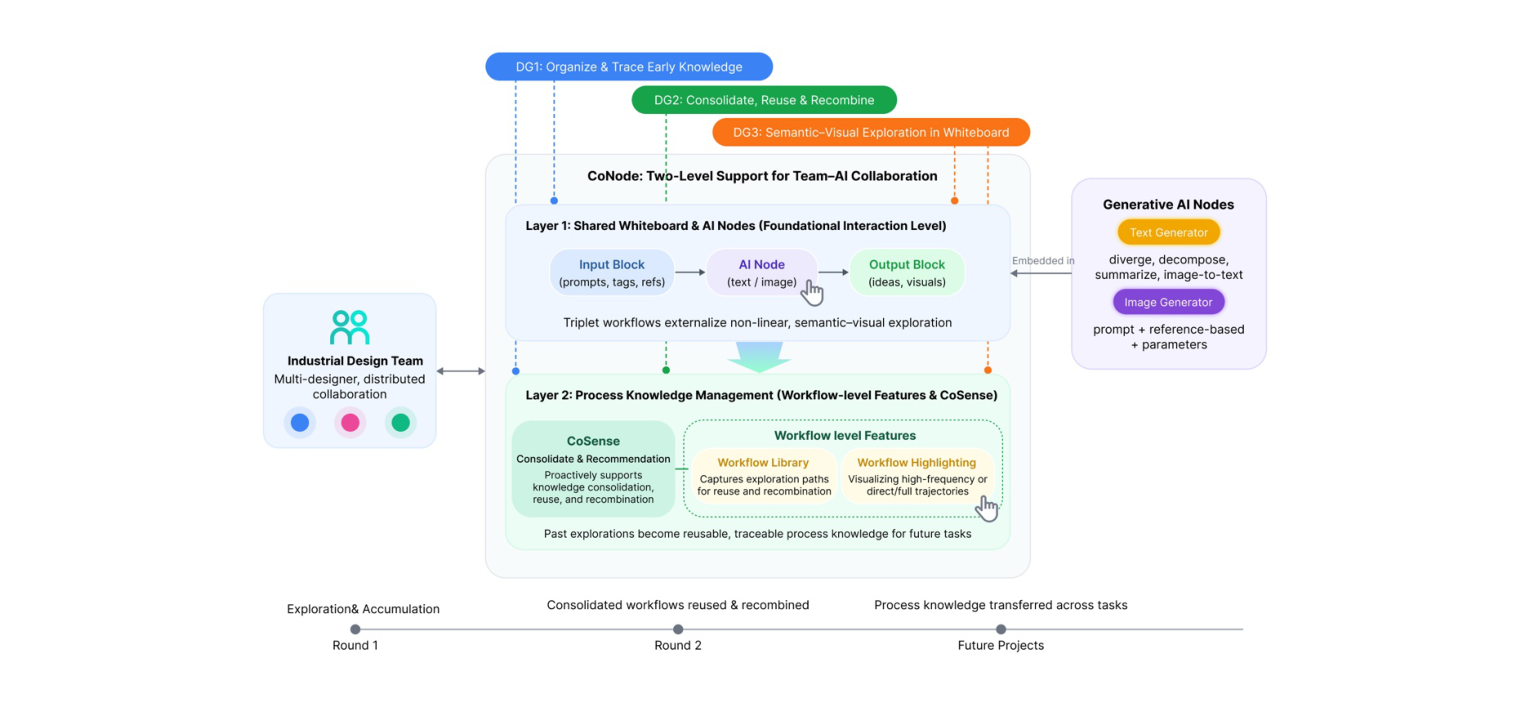
As Figure 1 shows, CoNode splits the problem into two layers: Layer 1 embeds AI nodes in a shared whiteboard so generation becomes a visible workflow; Layer 2 uses CoSense and workflow-level features to settle paths worth keeping for later reuse and recombination.
02 CoNode’s key move is taking AI out of the chat box and onto the whiteboard
Many AI creative tools default to Q&A. You enter a prompt; the model returns a result; the next generation leans on chat history or human memory. CoNode chooses differently: text and image generation become draggable nodes on a whiteboard, and teammates connect, move, and reuse those nodes in one shared space.
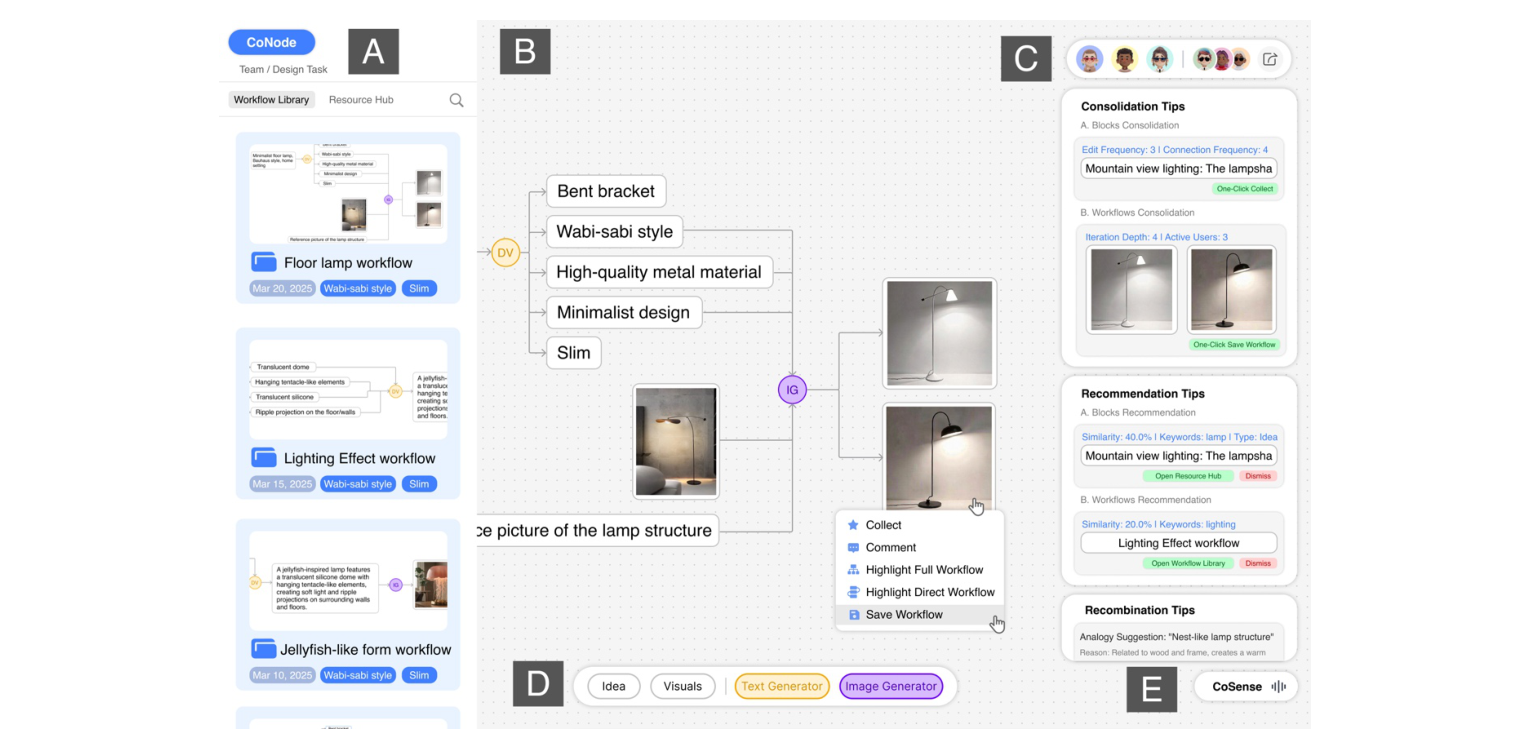
Figure 2 shows the interface. Left: workflow library and resource center; center: shared whiteboard; bottom: idea blocks, visual blocks, text generator, and image generator; right: CoSense. The layout’s point is not more buttons — it is that every generation stays, with context, in a space the team can all see.
That matters for multi-person work. Previously, when someone left the whiteboard for an external tool, others could only wait for results to be copied back. CoNode tries to cut that interruption: AI generation is no longer a private off-board operation — it is a process the team can watch, track, and keep working on together.
03 A triplet workflow gives a result a provenance
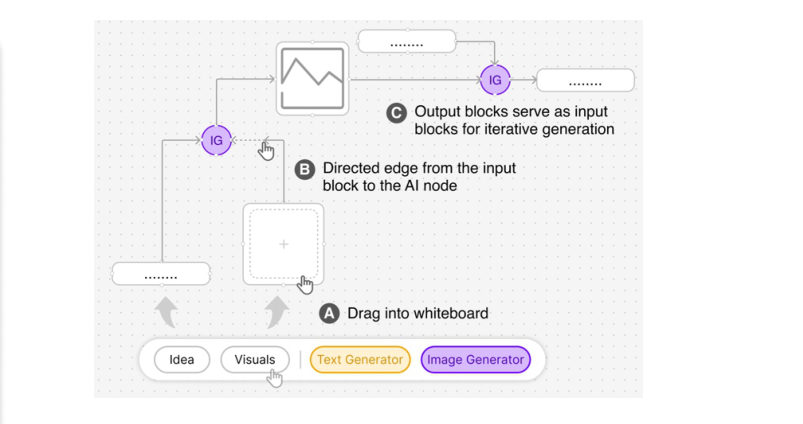
CoNode organizes generation with a simple structure: input block, AI node, output block. Inputs can be ideas, keywords, sketches, or references; AI nodes diverge, decompose, summarize, generate images, or turn images into text; outputs can be dragged back onto the board as inputs for the next generation.
As Figure 3 shows, the triplet workflow’s benefit is stitching scattered trial-and-error into a readable path. An output is no longer only a final image — it can be traced to which prompts, references, and prior ideas it consumed. In discussion, teams need not argue only about results; they can return to the path: which step steered direction off, which branch is worth continuing.
That is the paper’s most transferable design judgment: team AI tools should not only optimize generation speed — they should make generation paths operable objects. Once a path is operable, it can be highlighted, saved, dragged, reused, and recombined; otherwise it is history that is quickly forgotten.
04 The evaluation design tries to isolate CoSense’s contribution
The authors did not simply pit CoNode against plain ChatGPT or a plain whiteboard. That might make CoNode look stronger without clarifying why: the whiteboard UI? AI nodes? Or the process-knowledge layer?
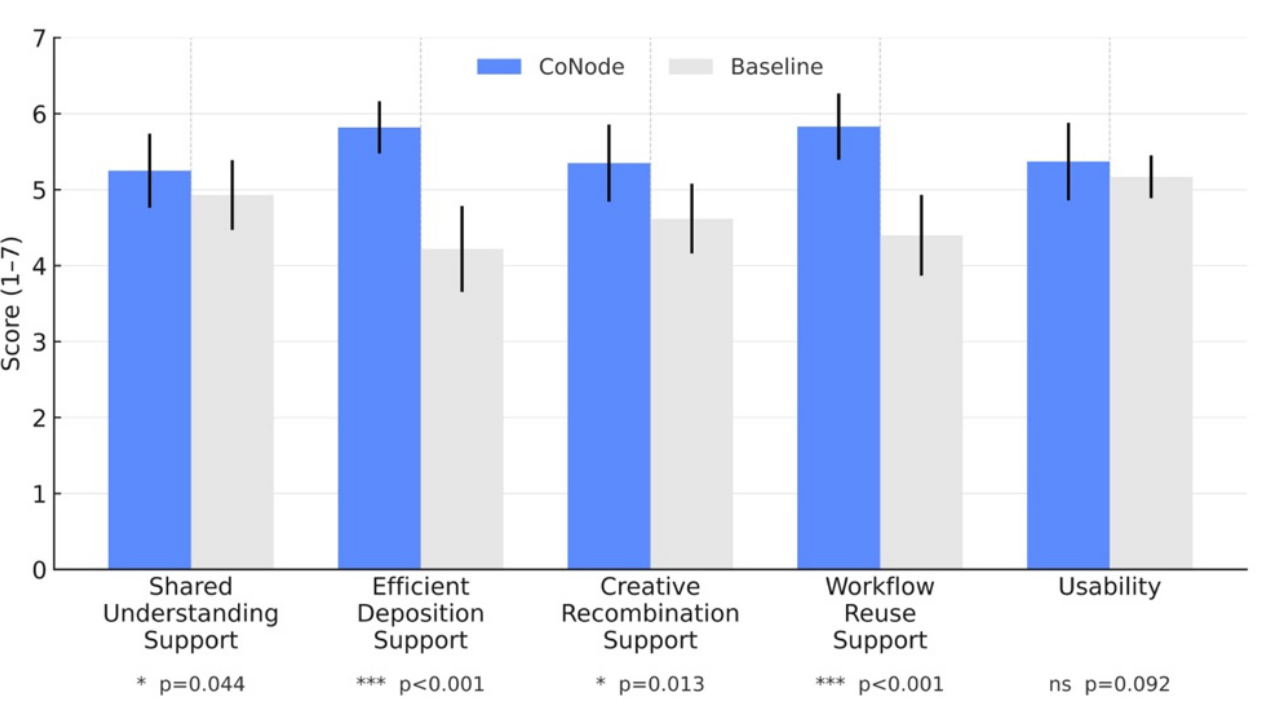
So the paper uses two-stage evaluation. Study I recruited 12 participants to validate basic interaction of in-whiteboard AI nodes and triplet workflows — mean SUS 77.48. Study II then recruited 30 participants as 15 dyads for a controlled within-subjects comparison. The baseline kept the same whiteboard, AI nodes, and triplet workflow, but removed the workflow library, workflow highlighting, and CoSense’s consolidation and recommendation.
That baseline is smart. Study II mainly asks one thing: given a visualized AI workflow already, does an extra process-knowledge layer help? Figure 4’s DKSS results show CoNode higher than baseline on shared understanding, knowledge consolidation, workflow reuse, and creative recombination support; usability differences were not significant, so the advantage is not only that the system was easier to use.
05 What is convincing is that behavioral data moved too
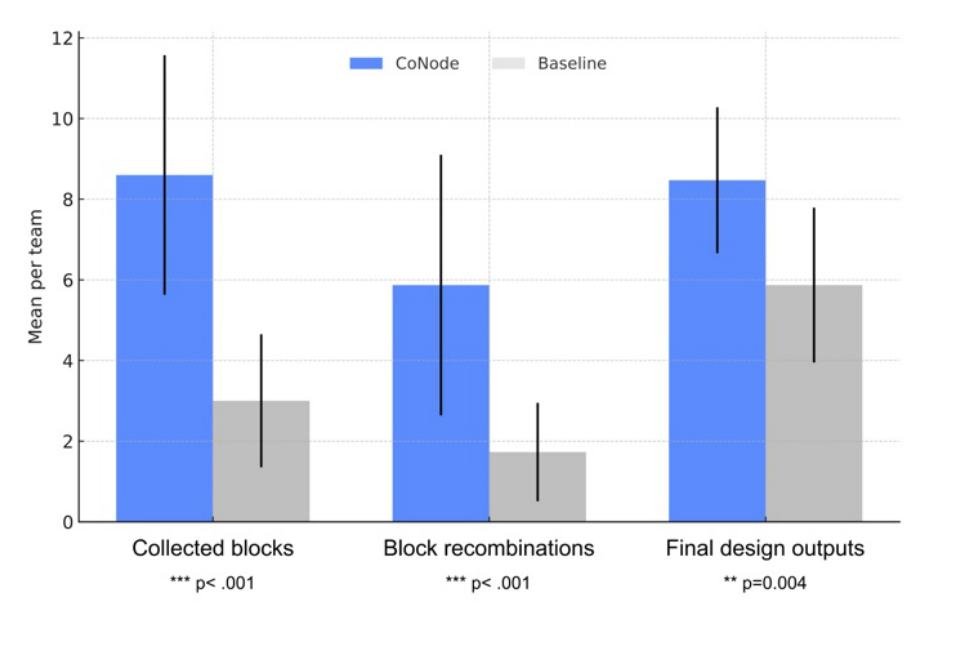
Questionnaires alone might look like preference. The authors also logged behavior, and the results are harder: under CoNode, teams collected 8.60 content blocks on average versus 3.00 for baseline; block-level recombinations averaged 5.87 versus 1.73; final design outputs averaged 8.47 versus 5.87. All differences reached the significance levels reported in the paper.
Figure 5 puts these three behaviors together: CoNode did not change one button’s frequency — it changed how teams handled past material. Prior exploration was not only archived; it was dragged back onto the board as material for the next design round.
The paper also reports 88 content-block reuses under CoNode versus 26 for baseline, and a workflow reuse rate of 63.6%. Those numbers support a finer claim: CoNode’s value is not simply that teams store more, but that stored things are easier to bring back into the current task.
06 What is worth taking away is not the system name — it is the process-asset lens
Feature-wise, CoNode includes a whiteboard, nodes, workflow library, recommendation panel, and LLM-assisted recombination. Behind them sits a larger product judgment: when AI enters team creation, what teams must manage is not only files and results, but accumulating process assets.
That rewrites how we evaluate AI design tools. We used to ask whether the model can generate better images, or produce more options faster. CoNode asks another set: can teammates see how each other arrived at those options? Can the next round catch the previous round’s thinking? Can AI-generated branches be reinterpreted rather than buried in chat history?
The paper does not mythologize reuse. Discussion notes another risk: collective fixation. Paths that are highlighted, edited often, or recommended by the system may become the team’s default direction and suppress unexplored branches. Once process knowledge is structured, it can both aid memory and manufacture anchors.
That is CoNode’s most generative cue for follow-on work. Next-generation team AI tools must not only save history — they must keep history open: help teams return to valuable paths, and also surface neglected branches so everyone does not walk only the most visible route.
07 Evidence strength is solid — but generalization should stay restrained
The evidence chain is relatively complete: formative study finds the problem, system design responds, two-stage user research separates basic interaction from process-knowledge mechanisms. Study II’s baseline is also restrained — it does not prop CoNode up with a weak tool.
It is still a controlled experiment. Study II tasks lasted about 2 hours, teams were dyads, and collaboration happened in a lab multi-screen setup. It simulates some features of distributed work, but cannot fully stand in for real remote teams, async collaboration, large interdisciplinary groups, or multi-week projects.
The paper notes that whiteboards can already get dense in dyads; larger teams may need auto-layout, clustering, and attention management. CoSense recommendations also have room to improve — especially reducing reinforcement of existing paths and steering teams toward contrastive, analogical, or counterfactual exploration.
So the steadiest landing is not that CoNode has proven the end state of future design tools, but that it puts a neglected problem on the table: the faster AI generates, the more teams need infrastructure that can save, track, and reuse the generation process.
Paper information
Original title: "CoNode: Visualizing Workflows for Knowledge Reuse and Recombination in Team-AI Collaborative Design"
Authors: Yang Zhou, Yi Xiao, Guangpeng Wei, Suxiang Ling, Ruoxuan Ma, Chi-sing Leung. Main affiliations include Hunan University School of Design and City University of Hong Kong Electrical Engineering. Published at CHI 2026. DOI: https://doi.org/10.1145/3772318.3791216.
Key terms
Process knowledge: in this paper, intermediate information produced in design that is often lost — semantic tags, sketches, references, exploration paths, design rationale, and team judgments. It is not the final proposal, yet it shapes whether later proposals can be understood and developed.
Triplet workflow: a generation path of input block, AI node, and output block. It turns one AI generation from an isolated result into a trackable structure so teams can see where a result came from and where it can go next.
CoSense: CoNode’s module for consolidation and recommendation. From connections, edit frequency, text similarity, and LLM-generated analogy or variation suggestions, it helps teams keep high-value materials and bring old paths into new tasks.
References
Zhou, Y., Xiao, Y., Wei, G., Ling, S., Ma, R., & Leung, C. 2026. CoNode: Visualizing Workflows for Knowledge Reuse and Recombination in Team-AI Collaborative Design. In Proceedings of the 2026 CHI Conference on Human Factors in Computing Systems. ACM. https://doi.org/10.1145/3772318.3791216