IEEE TSE 2026 | Copilot Helps Students Get More Answers Right — and Pulls More Attention into Debugging
An eye-tracking study with 50 students shows that Copilot raised task accuracy while also increasing completion time and visual cognitive effort.
Put GitHub Copilot into students’ programming tasks, and the most intuitive expectation is usually faster and easier work.
This eye-tracking study paints a less simple picture. Compared with a human peer, students under the Copilot condition achieved higher task accuracy — yet spent longer, and invested more fixations on the screen.
Copilot did not remove the cognitive work of debugging; it moved that work from producing candidate code to understanding, checking, and correcting candidate code. That is the judgment most worth taking from this paper.
01 Getting more answers right does not mean the process is easier
The study compared two forms of help: Copilot and a human peer. Under Copilot, students’ mean accuracy was 50%; with a human peer it was 32%. A statistical model showed a significant difference between assistance types for accuracy, p = 0.007.
Higher accuracy did not buy shorter completion time. Students averaged 17.9 minutes with Copilot and 16.8 minutes collaborating with a peer — about 6.6% longer with Copilot. Fixation count and total fixation duration were also higher. For beginners, AI may move answers closer to correct without finishing verification for them.
02 The same student debugs with AI and with a peer
The study recruited 50 software-engineering learners, mostly undergraduates and graduate students. Each person completed two task sets: one with GitHub Copilot, and one collaborating with a human peer via text chat. Each set included three comprehension and debugging tasks drawn from the open-source Glances project.
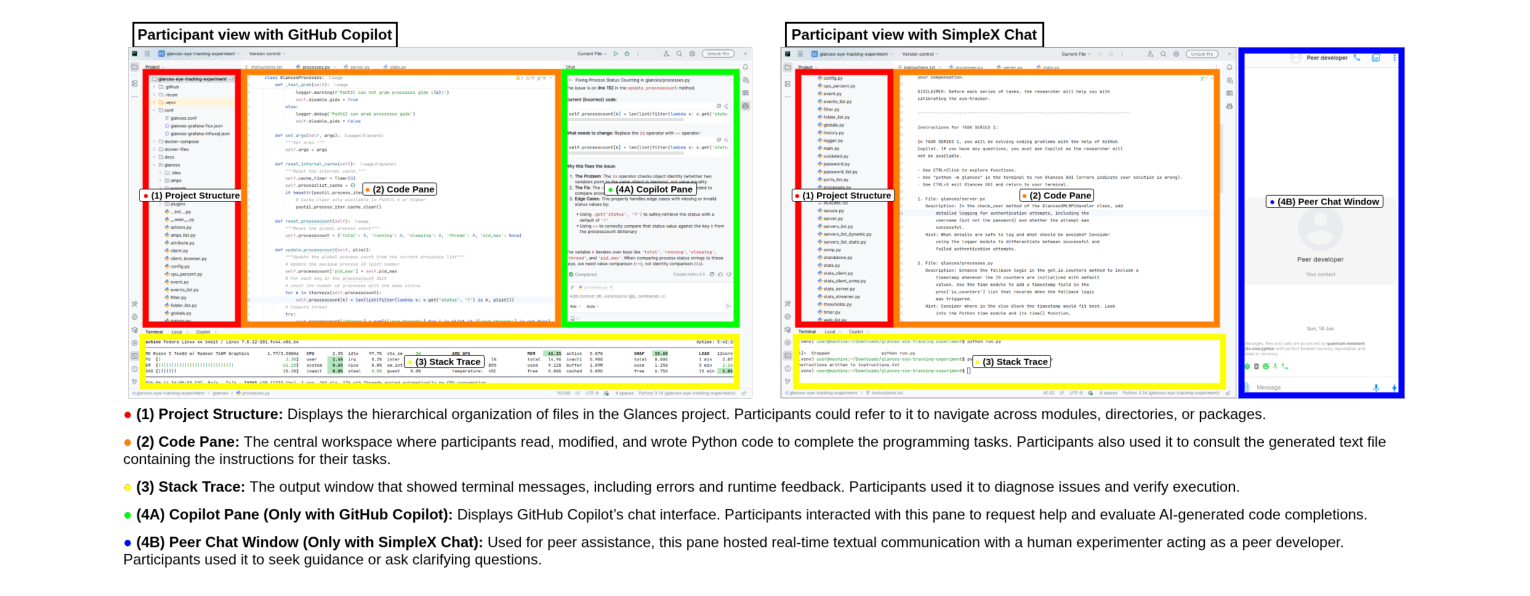
The two conditions were deliberately kept similar: both ran in PyCharm, both offered external help in text form, and the interface layout was fixed. Researchers used an eye tracker to record how students moved their gaze among project structure, the code pane, the stack trace, and the help window.
Figure 1 makes the comparison concrete. The difference is not whether AI has an answer, but that when students face Copilot-generated content they must return to the code and error cues to confirm whether it holds.
This within-subjects design reduces interference from baseline differences across students, but the pattern was still observed in a controlled experiment of about 60 minutes on a single open-source Python project. It should not be extrapolated directly to long-term courses, team collaboration, or architectural design.
03 Looking longer at the help window is not the same as trusting it more
The study used the share of fixation time on the help window as a behavioral proxy for reliance. Under Copilot, that share averaged 8.5%, higher than 6.3% for peer chat, p = 0.045. Students’ individual fixations on Copilot were also longer.
Conversely, the human peer’s chat window was visited more often — a mean of 40.8 times versus 29.8 for Copilot, p = 0.018. The difference resembles two collaboration rhythms: on the AI side, reading a generated result then going back to verify; on the human side, short back-and-forth confirmation.
Figure 2 shows the other side of self-report. Seventy-one percent of participants rated trust in AI at least moderate; but for high-intensity reliance on suggestions, participants rated peers higher. Behavioral attention and subjective trust do not coincide. Staring at Copilot longer may indicate reliance — or active review.
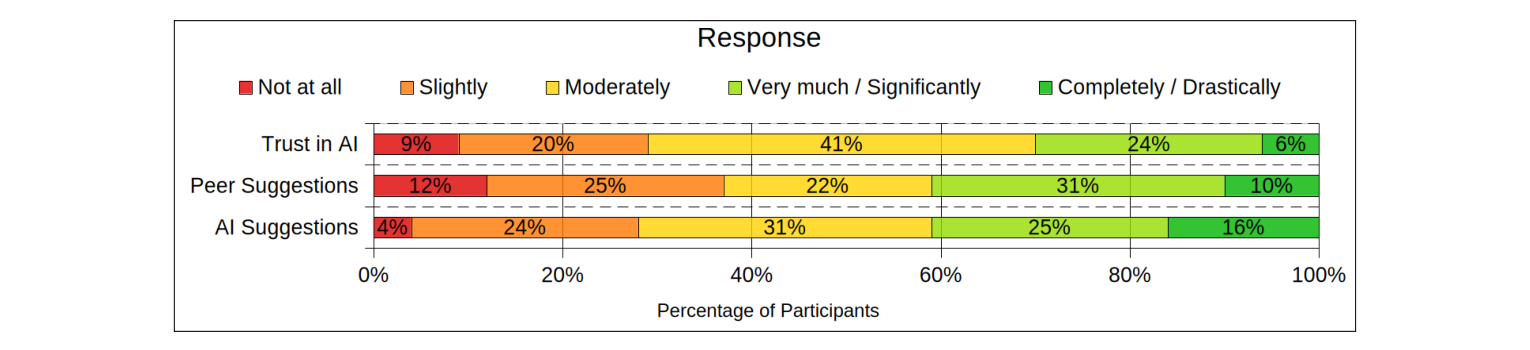
So one attention ratio alone cannot declare that students are already over-reliant. The paper’s value is precisely in placing self-report, performance, and eye tracking together: sometimes they agree, and sometimes they correct one another.
04 Students like Copilot’s speed — but do not hand code quality over with it
Figure 3 states the split plainly. Seventy-one percent of participants thought Copilot better improved speed; for concentration, Copilot received 45% preference, but 43% of answers were no difference, context-dependent, or uncertain.
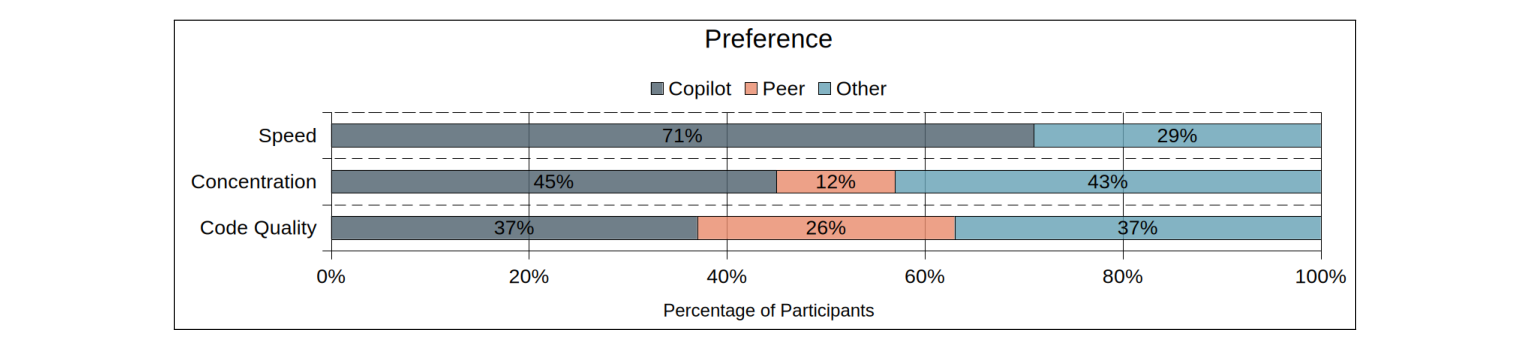
Judgments of code quality were even less one-sided: 37% chose Copilot, 26% the peer, and 37% other. The study does not show that students believe AI code is better; it shows they treat it as a resource for moving the task forward while keeping doubts about output quality.
That also explains an apparent contradiction: students are willing to use AI without necessarily trusting it lightly. For teaching, the key is not only teaching students how to ask, but teaching them to keep quality judgment under the temptation of speed.
05 The real cost sits in two windows outside the code
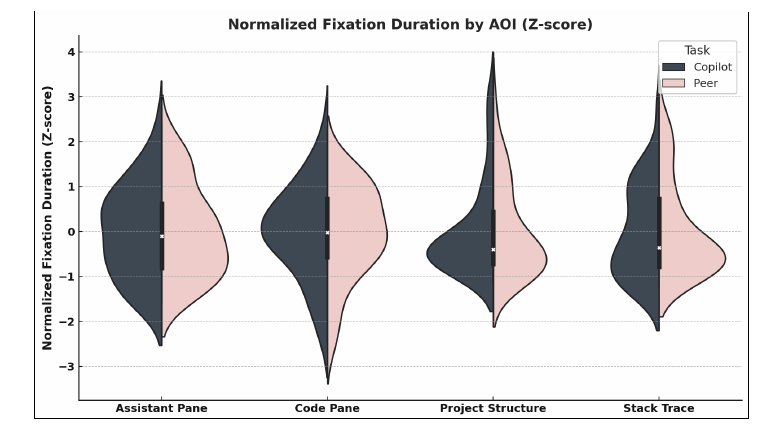
Figure 4 shows the distribution of normalized fixation duration across four interface areas. Under both conditions, the code pane held the most attention; the clearest differences appeared in project structure and stack trace — not in the help window itself.
Looking further at Figure 5, under Copilot students spent significantly more relative fixation duration on the stack trace, p < 0.001; the difference for project structure was marginally significant, p = 0.05. The paper offers an interpretation: after taking AI suggestions, students return more often to diagnostic cues to check whether generated content can plug into the existing code.
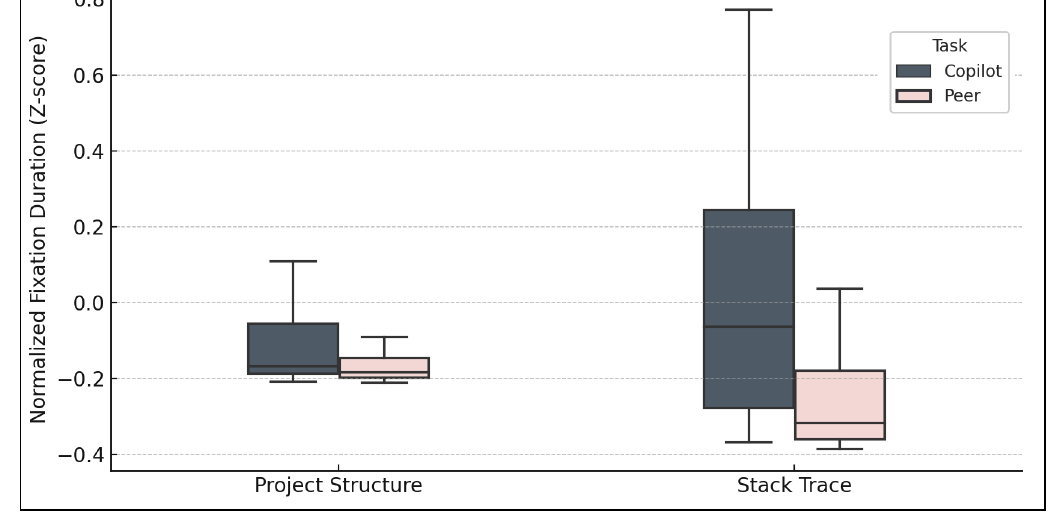
This does not directly prove that every fixation verifies Copilot; eye-tracking data cannot replace chat content or thought process. It does provide finer evidence than post-hoc questionnaires: AI assistance changes not only how often a single button is used, but the route students take through the IDE looking for evidence.
06 Teaching and tool design should make verification more visible
If AI programming tools are treated only as speed tools, teaching will miss the most important stretch. Students in the paper did not simply paste answers in; they spent more time on the stack trace, project structure, and code context. That verification burden is both a cost and a place where learning may happen.
For course design, a more practical approach is to make verification tasks explicit: ask students which context a suggestion depends on, which tests or error cues they used to confirm it, and at which step they rejected candidate code. What is evaluated is then not whether students used AI, but whether they kept judgment.
For tool design, the paper suggests placing multiple candidate completions closer to the code and using lightweight prompts to bring students back to project structure and diagnostic information. That direction still needs validation, but the goal is clear: reduce pointless gaze switching — not hide the checking process entirely.
Evidence boundaries also need stating. The sample is only 50 people, mostly students; tasks come from a single Python open-source project; accuracy is a coarse measure of whether a fix succeeded; and the human peer was played by a research-team member. What it supports is an interaction judgment under controlled conditions — not a general verdict on Copilot for all developers, all tasks, and long-term learning outcomes.
Paper
Original title: "AI or Ally? Understanding Student Reliance on GitHub Copilot and Human Peers Through Eye Tracking"
Authors: George Salib, Zohreh Sharafi
Affiliation: Polytechnique Montréal, Department of Computer and Software Engineering
Journal: IEEE Transactions on Software Engineering, 2026
Paper link: https://doi.org/10.1109/TSE.2026.3705249
Key terms
Cognitive load: Here approximated by fixation count, mean fixation duration, and total fixation time as psychological investment in task processing. It is not equivalent to learning quality, but it can reveal where students spent more processing resources.
Attentional reliance ratio: The share of fixation time on the help window among total fixation time on task-relevant interface areas. It is a behavioral cue, not the same as blind acceptance of suggestions.
Calibrated trust: Neither accepting a tool wholesale nor rejecting it wholesale, but adjusting use by task and evidence. The questionnaire and eye-tracking results in this paper jointly point to that complexity.
References
Salib, G., & Sharafi, Z. (2026). AI or Ally? Understanding Student Reliance on GitHub Copilot and Human Peers Through Eye Tracking. IEEE Transactions on Software Engineering. https://doi.org/10.1109/TSE.2026.3705249