Don't Let an Agent Run Straight Through to the End
CHI 2026's Cocoa system puts an AI agent into documents, using editable plans so researchers and agents can alternate planning, execution, and takeover.

📌 Original paper title
Cocoa: Co-Planning and Co-Execution with AI Agents
👥 Authors and affiliations
K. J. Kevin Feng, Kevin Pu, Matt Latzke, Tal August, Pao Siangliulue, Jonathan Bragg, Daniel S Weld, Amy X. Zhang, and Joseph Chee Chang. The first author is at the University of Washington; team members are affiliated with the University of Toronto, the Allen Institute for AI, the University of Illinois Urbana-Champaign, and related institutions.
🔗 Paper link
https://doi.org/10.1145/3772318.3791673
🧠 What this paper really asks
Many AI agents now chase stronger autonomy: give them a task and they plan, search, call tools, and produce a report on their own. Research work rarely suits a one-click run to the end. Researchers often need to revise the question as results appear, adjust direction while reading papers, hand some steps to AI, and keep other judgments for themselves.
Cocoa, proposed in this CHI 2026 paper, is not mainly about making agents more automatic. It is about letting people and agents co-plan and co-execute inside the same document, and change the division of labor at any time. The authors’ question can be summarized as: In complex tasks, can human–AI collaboration be broken into editable, executable, reversible steps—like a computational notebook?
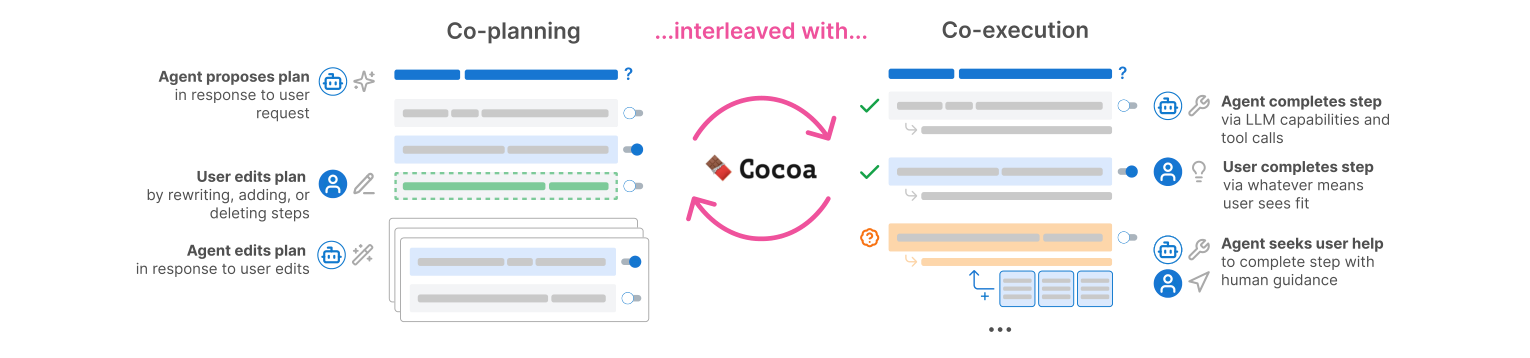
As shown in Figure 1, Cocoa integrates an AI agent into a research-document environment. User and agent share a set of task steps; each step can be marked for the human or the agent; execution results embed directly in document context. The document becomes not only a writing space but a collaborative workbench.
🔍 Why research documents
The authors first ran a formative study, interviewing nine PhD students who showed real project documents and tried a Wizard-of-Oz LLM-assisted prototype. Project documents already functioned as a project hub: meeting notes, to-dos, progress updates, research questions, literature links, and early reasoning.
Researchers wanted AI help in place inside the document, because the document already held project context—no need to re-explain everything in a chat box. They also did not want AI to seize high-level judgment. Participants were generally willing to hand literature search, preliminary organization, and brainstorming to AI, while keeping high-level reasoning, research taste, argument structure, and final decisions for themselves.
That led to Cocoa’s three design goals: support human–AI collaboration in both planning and execution; allow flexible per-step assignment to human or agent; and embed the agent seamlessly in the document without making the document chaotic.
🛠️ How Cocoa works
Figure 2 shows Cocoa’s core interface. After selecting a question or passage in the document, the user can invoke the agent. Based on the selection and full-document context, the agent proposes several plans; once the user picks one, it becomes an interactive step list inside the document.
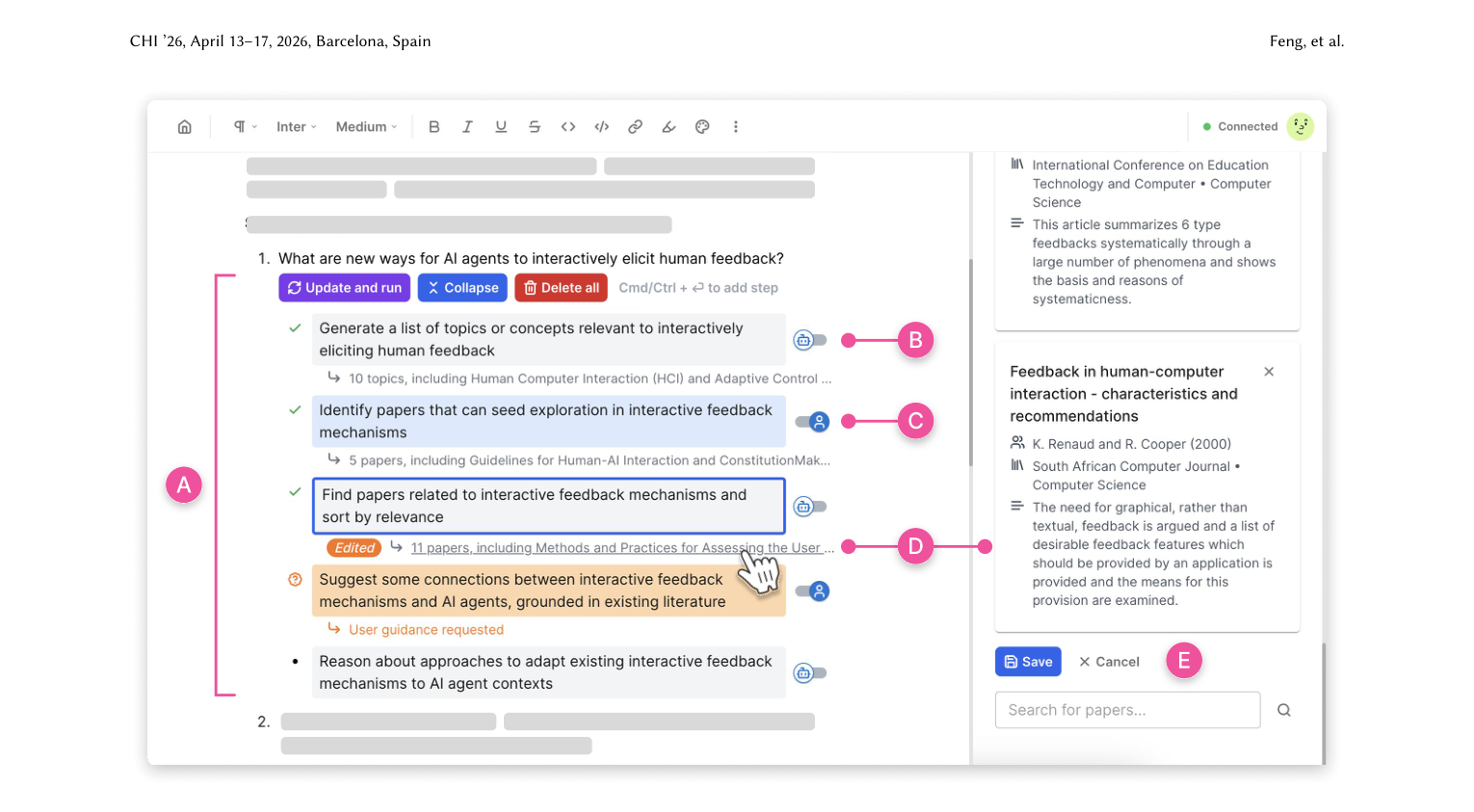
Each step can be edited, added, or deleted like an ordinary bullet list, and ownership can switch: give it to the agent, or keep it for the user. Low-risk but laborious steps—searching related papers, expanding early ideas—can go to the agent; high-risk steps that need research judgment—choosing seed papers, judging conceptual links—can stay with the human.
Figure 3 shows the invocation entry point. Users need not leave the document for a chat window; they select a question in place, and the agent generates plan candidates at that location. The value is that AI work is not floating outside the document—it is anchored in concrete research context.
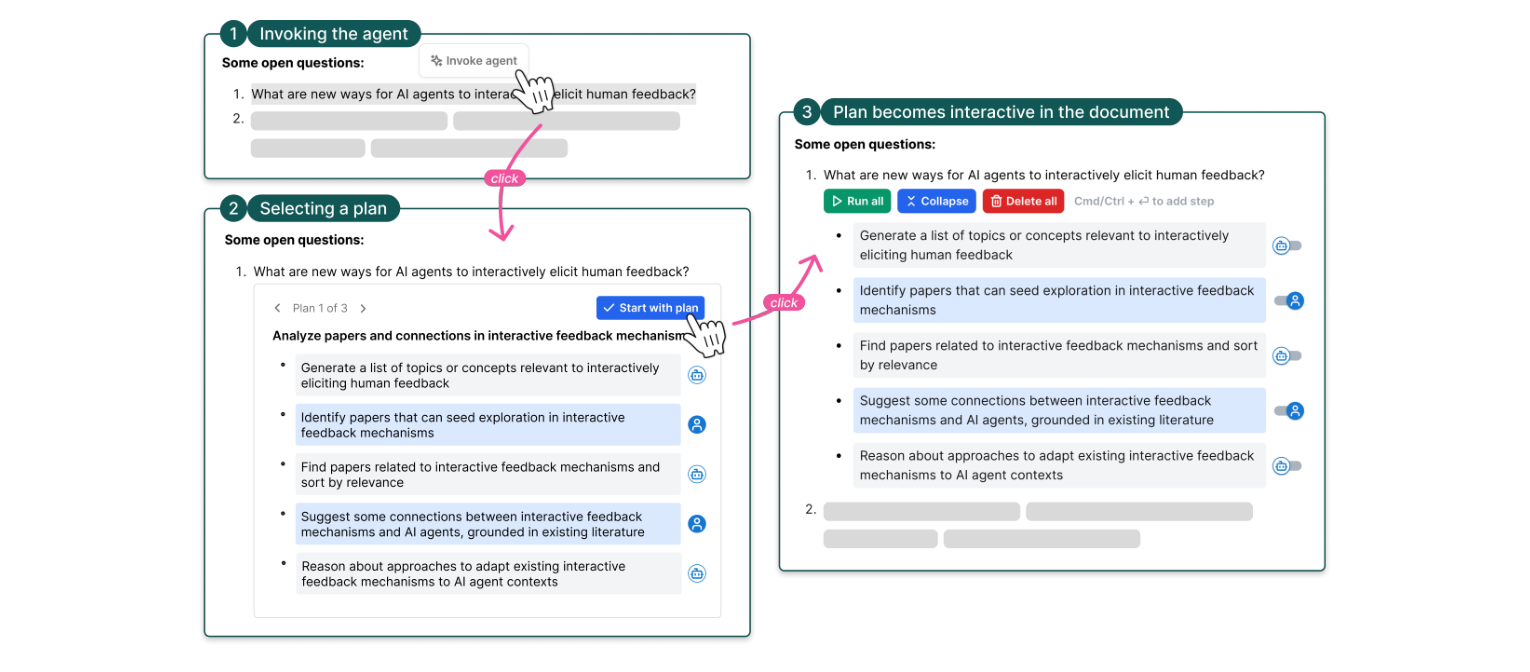
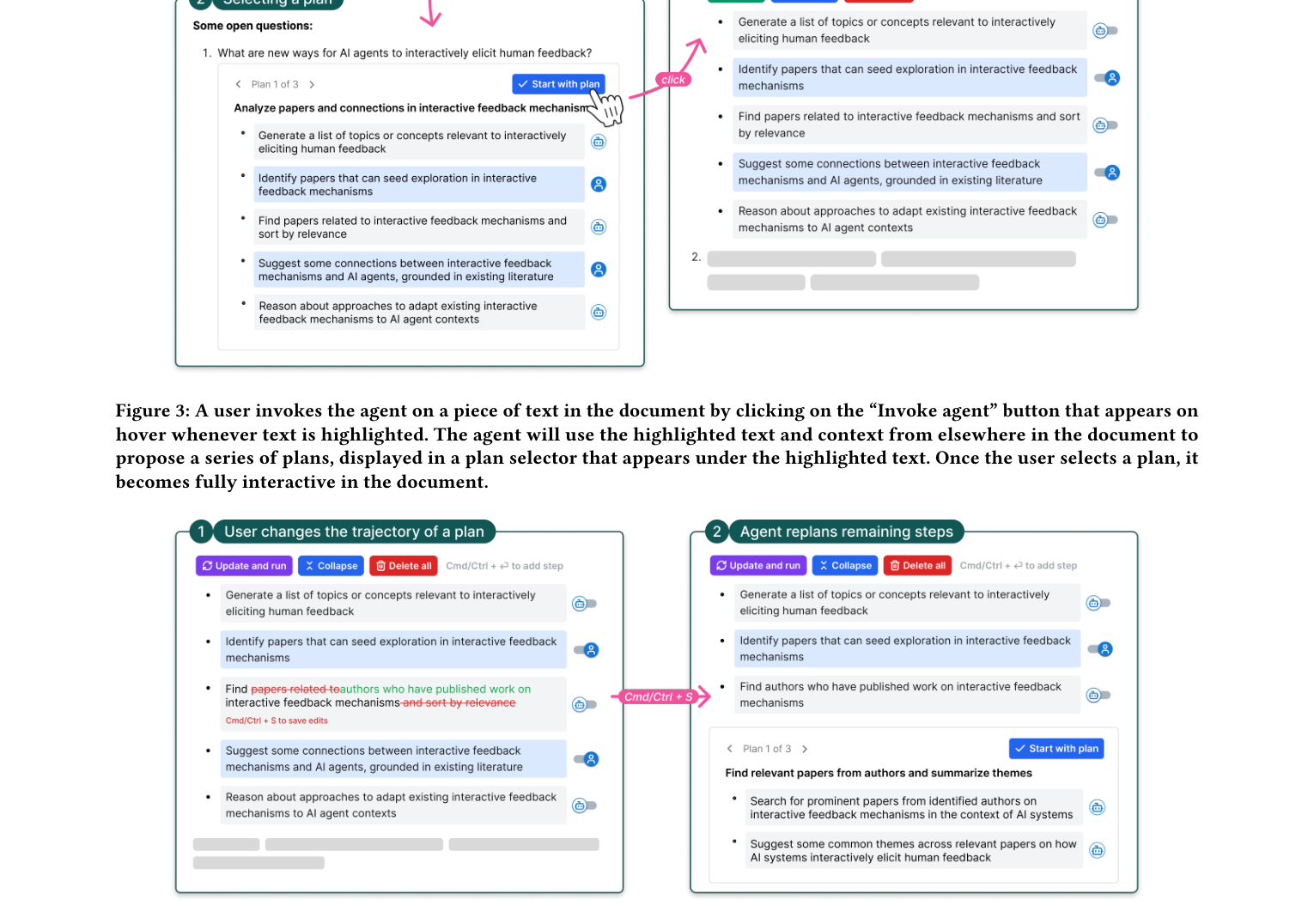
Figure 4 shows Cocoa’s replanning mechanism. If the user substantially edits a step and later steps no longer cohere, the system detects the break and triggers replanning, replacing subsequent steps. That matters because plans for complex research are rarely fixed at the start. Only after executing a step and seeing results does a researcher often know what should come next.
📓 Agent notebook: the paper’s most valuable design metaphor
Cocoa draws inspiration from computational notebooks. The virtue of notebooks is not that code becomes more automatic, but that a complex program is broken into runnable cells. Users can execute segment by segment, inspect output, edit an earlier cell, and rerun what follows.
Cocoa migrates that idea to agent workflows: plan steps behave like notebook cells. Users can execute stepwise or run all; inspect one step’s output before continuing; edit a step and let later plans shift. The authors call this a potential agent notebook design paradigm.
That fits complex tasks better than ordinary chat agents. In a chat box, if the agent errs at one step, users usually write another prompt asking the model to “consider this next time.” In Cocoa, they can return to the failing step, revise the plan or output, and continue from there. Control points are finer; rework costs less.
🔬 How the study was validated
The authors ran two kinds of evaluation. First, a lab study with 16 PhD students and postdocs in computer science or adjacent fields, who used Cocoa and a strong chat baseline on open tasks drawn from their own project documents. The chat baseline used the same underlying GPT-4o tool-calling agent and could also search and analyze papers on Semantic Scholar; it simply lacked Cocoa’s co-planning and co-execution interface.
Second, a 7-day real deployment invited seven lab-study participants to keep using Cocoa on their own research projects, followed by exit interviews.
📊 Key findings
First, Cocoa improved controllability without a significant usability cost. On a 5-point scale, Cocoa’s steerability median was 4 versus 3 for the chat baseline—a significant difference, p = 0.005. Ease of use did not differ significantly (Cocoa median 4, baseline 4.5). Cocoa added interaction control points without making the system feel clearly harder.
Second, users actually used those control points. In the lab study, users spent 15.2% of session time on co-execution in Cocoa, versus only 3.1% on the closest chat-baseline activity—“revising output via prompts.” Time spent inspecting outputs also fell from 54.1% in the baseline to 33.6% in Cocoa. When the system offers operable intermediate steps, users shift from passively reading agent output toward actively editing and advancing work.
Third, plans were not static manuals but thinking tools after execution. Participants often revised plans after seeing a step’s output—changing later search directions, adding follow-ups, deleting off-track steps, or reassigning a step from agent to user. That is exactly what Cocoa aims to support: planning and execution are not two phases; they interleave.
Fourth, after longer use, the human–AI division of labor matured. In the lab, many participants initially tended to hand every step to the agent—partly from curiosity about what it could do, and partly under time pressure. After the 7-day deployment, participants more often reserved high-level judgment, argument writing, experiment running, deep reading, and novelty assessment for themselves, while giving search, organization, and preliminary synthesis to the agent.
🧩 The deeper point of the paper
Cocoa pushes against a one-way automation fantasy: the user hands off a goal, the agent finishes everything in the background, and the user accepts the result at the end. For open research tasks, that pattern has two problems. First, agent plans often need domain knowledge and tacit judgment. Second, users clarify their questions while inspecting intermediate results.
So Cocoa’s contribution is not stronger model capability but a more sensible collaboration form. It makes the agent’s process visible, stepwise, and editable, and lets users embed professional judgment at each step. In a sense, it turns the agent from a black-box outsourcer into a co-editable workflow partner.
✅ How strong is the evidence
The paper’s evidence chain is relatively complete: a 9-person formative study to distill needs, then a system implementation, then a 16-person lab study and a 7-person one-week deployment. The baseline is also strong, because underlying agent capability is matched; differences mainly come from interaction design.
Sample size is still limited, and participants were mainly CS and CS-adjacent researchers. Value on research literature work does not mean Cocoa transfers directly to every industry task. The lab study also lacked finer ablations—for example, editable plans without stepwise execution—so the contribution of each feature cannot be precisely separated.
⚠️ Limits and future directions
Cocoa lives in a document editor, which fits research project documents, but linear documents are poor at expressing branching plans. If users want to explore several directions at once, a node-based canvas or plan branching may fit better. The authors also note that future systems should support checkpoints and branches so replanning does not discard still-valuable outputs from earlier steps.
The underlying agent has limits too. It cannot handle visual materials such as figures or slides, and cannot execute code. For research work, that constrains Cocoa on data analysis, figure understanding, and experiment reproduction. Connecting multimodal agents and code execution could raise value—and would also raise safety and cost-control needs.
🚦 Implications for agent product design
The paper offers a practical suggestion for any long-horizon agent: do not offer only “start” and “done.” Complex tasks need intermediate states—places where users can see the plan, edit it, inspect one step’s output, and decide who does the next step.
When tasks are high-risk, costly, or judgment-heavy, agents should not default to full automation. Better design lets users see the execution path ahead of time, keep high-risk steps for humans, hand low-risk high-labor steps to the agent, and reassign mid-run. That is more controllable and often cheaper.
In other words, future agents may compete less on whether the model can “do the work,” and more on whether they can turn the process of doing work into a collaboration structure users can understand, intervene in, and reuse.
📚 Key terms
📝 Co-planning: humans and agents jointly form a task plan. The agent can propose an initial plan; the user can edit, add, delete, and reorder.
⚙️ Co-execution: humans and agents jointly carry out the plan. Some steps run by the agent, some by the user; intermediate outputs can be inspected and revised.
📓 Agent notebook: structuring agent plan steps like notebook cells, supporting stepwise execution, output inspection, and reruns.
🎛️ Steerability: the user’s ability to guide the system toward useful outcomes. Cocoa’s main advantage is raising controllability.
🤝 Co-agency: humans and AI do not fix who leads; control and responsibility are dynamically assigned across steps.
📖 Reference
Feng, K. J. K., Pu, K., Latzke, M., August, T., Siangliulue, P., Bragg, J., Weld, D. S., Zhang, A. X., & Chang, J. C. (2026). Cocoa: Co-planning and co-execution with AI agents. In Proceedings of the 2026 CHI Conference on Human Factors in Computing Systems. ACM. https://doi.org/10.1145/3772318.3791673